Docs / Race Control
Stewards
Run a race from race control - flags, messages, procedures, penalties and incidents.
Everything you do in race control goes into the league’s audit log, under your pseudonymous steward id.
The header
The flag, session, track, lap or time left, the failsafe, the number of stewards, and the agent that sends the commands (the executor). On the right: Report an issue, sound and Edit layout.

Layout
Edit layout lets you move, resize, hide and add cards. Layouts are saved to your account, one per device type (PC, tablet, phone). Extra cards include a circle map, a line map, lap times and the weather.
Calls
Anything that changes the race opens a dialog. Press and hold its button to confirm.
- iRacing commands: full course caution, pit lane open or closed, pace laps. Pace laps wait until iRacing accepts them.
- Message to drivers: a banner to everyone, a class, chosen cars or stewards only. Stays as banner keeps it up until it’s withdrawn.
- Announce in the iRacing chat: a line in the session chat.
Procedures
Start a procedure lists the league’s published procedures. Running procedure shows the current step and the buttons it waits for, such as “Field gathered”. You can stop it there. A safety car procedure can open the sorting view, which shows each car where it belongs behind the safety car.
Penalties
Choose Penalty, then the car and the catalog entry. Black flag penalties go to iRacing first. The driver’s banner follows once the agent sees the flag. If the flag isn’t there within 15 seconds, the penalty is marked not applied with the reason, and you can issue it again.
To revoke a penalty, give a reason. iRacing’s clear removes all of a car’s flags, so Race Control shows which penalties it will apply again before you confirm. Disqualify and remove can’t be undone in iRacing.
Incidents
The Incidents card groups incident points into cases: cars involved at the same place and time. Review opens a case.
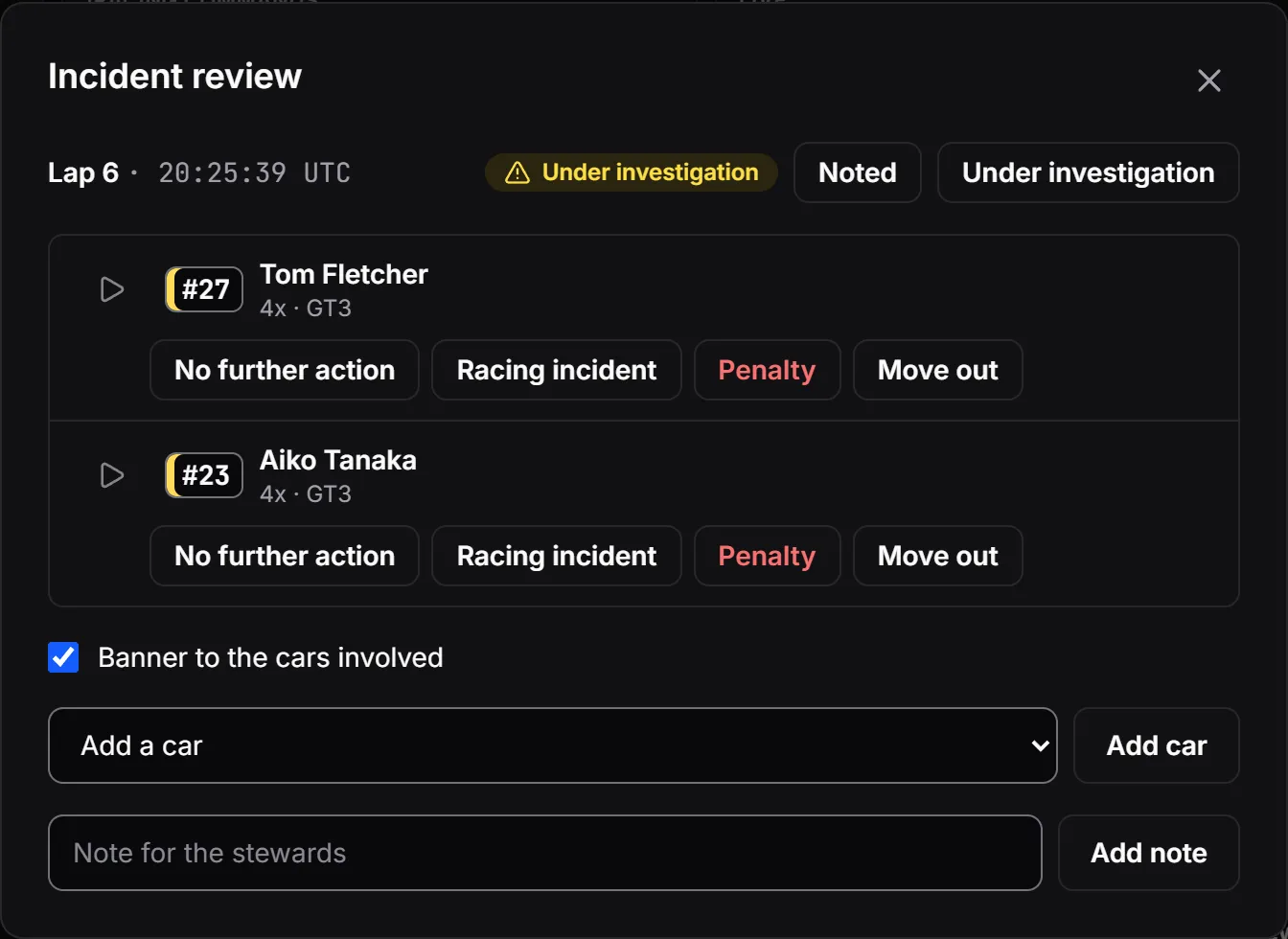
- Replay plays the incident on your own sim. It needs your own agent in the session, not the executor. A view-only agent (no admin rights) is ideal.
- Mark it investigating, decide no action or a penalty, add notes, or add and remove cars.
- The cars involved get a short banner about the decision, unless the league turned that off.
- Cases are reviewed in race control while the session is open. Close all open in the Incidents card gives every car still open no further action, without banners.
- After the session closes, decide the cases still open on the session’s Incidents page (from its results): no further action, racing incident, or a penalty that needs nothing in iRacing (a time penalty or a message). Time penalties change the results; if they were marked final, amend them. The overview says how many cases are open before you close the session.
The Live card
The session’s timeline: commands and their result in iRacing, messages with how many screens showed them, penalties, incidents, and agents joining or leaving. Filter it by type.
Results
- Results in the league menu lists your sessions with each class’s winner. A session’s page is also linked from race control’s header.
- The race is ordered with the time penalties applied: a car moved by a penalty says why. Practice and qualifying keep iRacing’s order. Tabs switch between the sessions, chips between the classes.
- Mark final keeps the results as they are. A penalty changed afterwards shows a notice until you Amend the results, with a reason. Both are in the audit log.
- Export downloads the results, lap times, incidents and penalties as CSV. Print report opens a report to print or save as PDF.
The audit log
- Audit log in the league menu shows the log in words, one session at a time, or the league’s own entries. Raw shows them as they’re stored.
- Export JSON or Export CSV downloads the log. Once the session is closed, the page also shows its checkpoint: the last checksum.
- Anyone can check an exported log in their browser and see whether an entry was changed, removed or moved. Share the file and the checkpoint with your drivers.
When something goes wrong
- The executor drops out: another active agent takes over, and race control tells you.
- No agent left: the league’s failsafe procedure starts after a countdown, if one is set. You can cancel the countdown.
- Something else: Report an issue in the header sends your note and the session’s state to the PaceLaps team.